

Cash App
✓ Verified AppCash App is a mobile financial services app that lets eligible users send and receive money, manage a Cash App balance, use a Visa debit card, receive direct deposits, buy and sell Bitcoin, invest in stocks (where available), and make everyday payments. It is designed for individuals who want a simple way to manage personal finances from their smartphone.
What is Cash App?
Cash App is a peer-to-peer (P2P) payment and personal finance app from Block, Inc. (formerly Square). Launched in 2013 as “Square Cash,” it lets users instantly send and receive money to friends, family, or businesses in the U.S. It also offers a free customizable debit card (the Cash Card), a high-yield savings feature, stock and Bitcoin investing, direct deposit for paychecks, tax filing, and other financial tools. Anyone 13 years or older (with parental approval for minors) can use this app. It’s particularly popular with younger and lower-income users in the U.S., in part because of its ease of use and broad feature set.
Cash App solves the need for quick, fee-free money transfers and basic banking services. Instead of dealing with checks, cash, or wires, users can pay each other by phone number, email, or unique $Cashtag username. The app’s popularity has grown due to its simple interface and extras like free stock and Bitcoin investing, “Boosts” (instant discounts with the Cash Card), and up to 3.25% savings interest for qualifying users. Millions use this app to split bills, get paid early via direct deposit, and manage everyday spending on their phones.
The platform’s unique features (beyond basic P2P transfers) include instant free Bitcoin transactions between its users, the ability to round up purchases to save money, and “Cash Boosts” – cashback deals when using the Cash Card at certain merchants. It is designed for both everyday consumers and small businesses for receiving payments, and it has become widely trusted: over 57 million users and $283 billion in inflows were reported in 2024. However, users should remember Cash App is not an FDIC-insured bank; when linked with a Cash Card, eligible balances have FDIC pass-through insurance via partner banks.
Quick Information Table
| Developer | Block, Inc. (formerly Square, Inc.) |
| Category | Finance / Money Transfer / Investing |
| Platforms | Android, iOS (iPhone) |
| Current Version | 5.60.0 (updated Jul 2026) |
| Initial Release | Oct 2013 (as “Square Cash”) |
| Pricing | Free to download. No monthly fee for basic services; optional fees for instant transfers, ATM withdrawals, etc. |
| Availability | Primarily USA (as of 2026; UK service ended in 2024) |
| Languages | English (US), Spanish |
| Security | Encryption in transit, 24/7 fraud monitoring, PIN/biometric login, lock cards, FDIC pass-through insurance (up to $250K) |
| Official Website | cash.app |
| Help Center | cash.app/help |
| Last Reviewed | July 2026 |
Cash App Statistics
- Users: It has over 57 million active users (2024).
- Downloads: 100 million+ (Google Play); available globally, but concentrated in the U.S.
- Availability: Services in the U.S. (14–17, previously UK until Sep 2024).
- Supported Countries: While the app can be downloaded on phones worldwide, features are designed for U.S. operations. (European services under “Verse” were discontinued in 2023.)
- Developer: Block, Inc. (NASDAQ: SQ), founded by Jack Dorsey.
- Release Year: 2013 (as Square Cash).
Key Features of the Cash App
Every major feature (payments, debit card, investing, crypto, taxes) is integrated into one app, making this app a versatile finance tool for users who want more than simple P2P transfers. Cash App offers a variety of features:
- Peer-to-Peer Money Transfers: Send or request money from any contact by phone number, email, or $Cashtag. Transfers are instant and free when using your Cash App balance or a linked bank account.
- Cash App Card (Custom Debit Card): A free, customizable Visa debit card that you can order in-app. Use it to spend the app’s balance at merchants or withdraw cash at ATMs. The card has no monthly fee and works with Apple/Google Pay. Users can choose card designs and even add the card to their phone’s digital wallet. With the Cash Card, you earn Boosts – instant discounts at select stores and restaurants when you pay using the card.
- Banking Services: Set up direct deposit so paychecks arrive up to 2 days early, or link a bank account/debit card to Cash App to add money. It offers no-minimum savings (up to 3.25% interest for “Green” status customers) and no monthly fees. The app also now allows users to overdraft up to $200* (without fees) after meeting certain criteria.
- Bitcoin Buying & Selling: It was one of the first payment apps to add Bitcoin (BTC) trading (2018). Users can buy and sell Bitcoin through the app. Fees apply based on transaction size and speed. It even supports instant Bitcoin transfers between its users via the Lightning Network (fee-free).
- Stock Investing: Users 13+ can buy fractional shares of U.S. stocks and ETFs with as little as $1. Cash App Investing is commission-free. You can set up recurring stock purchases or spend on the fly. (Requires identity verification for extended limits.)
- Cash App Taxes (Free Tax Filing): Acquired from Credit Karma in 2020, Cash App Taxes is a free DIY tax-filing service for U.S. federal and state returns. Filing is included for its users at no extra charge.
- Cash App Green: A premium membership tier. Spend $500+ per month with your Cash Card or deposit $300+ in paychecks to earn Green status. Green members get perks like up to 3.25% APY on savings, unlimited fee-free ATM withdrawals (in-network), and free $200 overdraft coverage.
- Cash App Loans: Cash App Green users may access short-term loans (“Cash App Borrow”), typically $20–$200 with a 5% fee for four-week repayment.
- Cash App Pay & QR Codes: Pay merchants or friends instantly by scanning a QR code or tapping “Cash App Pay” at checkout.
- Cash App Rewards (Cash Boosts): Instant discounts when using the Cash Card at select brands. Users can activate 1-3 Boosts in the app to save on groceries, restaurants, etc.
- Cash App Pool: Group payments feature to collect money from multiple people (e.g., gifts, splitting bills). Note: Pools was introduced but is being phased out in favor of Cash App Pay QR codes and Cash Tags.
- Privacy/Security Features: Optional Security Lock (PIN/biometric), card lock (instant disabling), two-factor sign-in code, and real-time fraud monitoring.
Supported Devices
Cash App is primarily a mobile app, available for smartphones and tablets. Supported devices include:
- Android phones/tablets: The Android app is available on Google Play (requires Android 7.0 or later). Latest version updated July 2026.
- iPhone: Available on iOS (requires iOS 17.0 or later as of mid-2026). Rated 4.8★ with ~8.5M reviews on the App Store.
- iPad: The app is designed for iPhone. There is no separate iPad version; however, iPads running iOS 17 may run the iPhone app in compatibility mode.
- Web (Desktop): You can access some features on the web by logging in at cash.app via a browser. You can view balances and send money, but most management tasks are done in the app.
- Smart Devices & Wearables: There is no official Cash App watch app. Some users receive notifications on smartwatches (Apple Watch) via phone sync.
- Other: It is not available on Windows or Mac as a standalone download (use the web interface instead). There is no Android TV or similar.
Because the core functions are mobile-centric (camera for scanning, SMS for login codes, etc.), this app is intended for phone use. Both Android and iPhone users have full functionality, including the Cash Card and Bitcoin features.
How to Download the Cash App
Android (Google Play):
- Open the Google Play Store on your Android device.
- Search for “Cash App” (developer: Block, Inc.).
- Tap Install (the app icon is a green square with a white dollar sign).
- After installation, open the app and proceed to sign up.
iPhone (App Store):
- Open the App Store on your iPhone.
- Search for “Cash App” by Block, Inc. (or click this link).
- Tap Get and install the app (400+ MB).
- Launch the app to begin setup.
Desktop/Web:
- While there’s no desktop app, you can manage your account online. Visit cash.app in a web browser. Use Log in (top right) and enter your phone/email and verification code to access your account. From the web, you can send money, view history, and manage your Cash Card.
Important: Always download the app from the official app stores or cash.app. Beware of imposter apps; look for the developer “Block, Inc.” and high user ratings. Do not download Cash App APKs from third-party sites.
How to Set Up the Cash App
- Install and Open the App: After downloading, open Cash App on your phone.
- Sign Up: Tap “Sign Up”. Enter a valid U.S. phone number or email address. The app will send a verification code (via SMS or email) – enter that code when prompted to confirm your contact.
- Create an Account: After verifying, you’ll be prompted to link a bank account or debit card. Enter your debit card details (card number, expiry, CVV, ZIP code) to add funds. This step can sometimes be skipped and done later, but linking a payment method lets you send/receive immediately.
- Enter Personal Details: Provide your full name, date of birth, and (optionally or later) Social Security Number (SSN) or Tax ID. Verification up to 7 digits of SSN unlocks higher limits and features (stocks, Bitcoin, and higher sending limits).
- Create $Cashtag: Choose a unique $Cashtag (e.g., “$yourname”) – this is your public username for payments. It must be 3+ characters.
- Set a PIN: You’ll set a 4-digit PIN for quick logins or confirm by fingerprint/face ID (on supported phones). This secures your app.
- Add Cash (optional): To start using the app, you can tap the “Money” icon and “Add Cash” to transfer money from your linked bank. (You can also skip and add later.)
- Order Cash Card (optional): If desired, tap the Cash Card tab to order a free physical debit card. Choose a design, and it will arrive by mail. You’ll need to verify identity (usually photo ID) to order a card.
- Enable Security Features: In the app’s Profile > Privacy & Security, turn on Security Lock (Face/Touch ID or PIN) for extra protection.
After setup, your Cash App account is ready. Your phone number/email is linked to your account. Always keep your login info and PIN secure. If you ever need to verify again, the app will guide you through any additional steps (e.g., providing SSN or photo ID for full access).
How to Use the Cash App
- Sending Money: To pay someone, open the app and tap the “$” (Payments) tab. Enter the dollar amount, tap Pay, then enter the recipient’s phone number, email, or $Cashtag. Add an optional note and tap Pay again. The recipient will get the funds instantly. It uses 256-bit encryption and fraud monitoring to keep transfers secure.
- Requesting Money: In the same Payments tab, enter an amount and tap Request instead of Pay. Enter the person’s info and send the request. The person gets a notification to send you money.
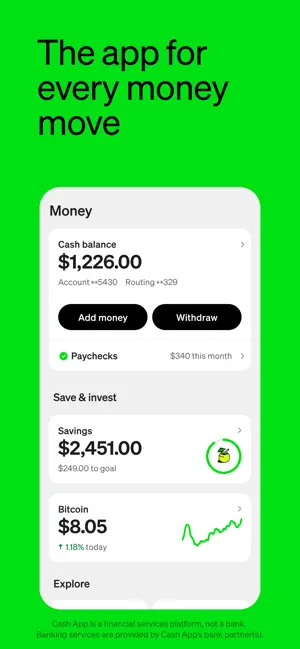
- Receiving Money: When someone pays you, you’ll see the payment in your Activity (clock icon), and your Cash App balance will increase. Funds stay in your account until you send them or withdraw to a bank. To see your balance or history, tap the dollar sign on the main screen.
- Adding Cash: Tap the “Bank” (or “Money”) icon, then “Add Cash”. Enter an amount and confirm with your PIN or Touch ID. Funds will transfer from your linked bank/debit into the app.
- Withdrawing Cash: You have two options:
- Cash Out to Bank: Tap “Bank” > “Cash Out”, choose Standard (free, 1-3 business days) or Instant (small % fee), and select an amount to send to your linked bank account.
- ATM Withdrawal: If you have the Cash Card, use it at an ATM. Standard ATM fee is $2.50 per withdrawal (waived for Cash App Green users).
Note: Always keep the Cash Card unlocked in-app to use it.
- Cash App Card: To use the Cash Card, open the Cash Card tab. Tap “Activate Cash Card” and use your phone camera to scan the card or enter the CVV code. You can lock or unlock the card instantly from the app if it’s lost or you want to stop charges.
- Investing in Stocks/Bitcoin: In the app, tap Investing or Bitcoin. Browse available stocks or Bitcoin, then buy or sell by entering an amount. (You must verify identity [SSN] to access the full range of investing up to regulatory limits.) The app displays any transaction fees before you confirm. It automatically updates your crypto/stock portfolio value on the home screen.
- Direct Deposit (Paychecks): In the Bank tab, tap “Set up Direct Deposit” to get your Cash App account and routing numbers. Give these to your employer or payroll provider. Your paycheck will then go into the app (up to 2 days early).
- Cash App Taxes: In-app under Taxes or via cash.app/taxes, connect your Cash App account to the free tax filing software. Follow the guided steps to import income and file state/federal taxes at no cost.
- Other: Use Search or the Profile icon to access features like My Boosts, Auto-Invest, Bitcoin Keys (for withdrawals), Business Profile, etc. The app is generally intuitive once set up.
In general, always ensure you are sending money only to trusted contacts (Cash App warns if you might be paying the wrong person or a potential scam). Keep your phone secured, and use the app’s built-in security locks.
Common Uses
Cash App is used in many real-world scenarios:
- Splitting bills: Roommates or friends easily split rent, utilities, dinner, or group gifts by sending and requesting funds.
- Peer payments: Pay back a friend for coffee, babysitting, or any personal loan with a few taps.
- P2P commerce: Buying/selling second-hand items (like on Facebook Marketplace) or collecting payment for services. (Just send via phone number or Cash Tag.)
- Paying businesses: Many small businesses and independent sellers accept Cash App by displaying a QR code or $Cashtag. Customers pay instantly with Cash App Pay.
- Youth allowance and chores: Teens (13–17, with parent approval) use it for allowances. Parents can monitor, and kids can learn money management (no overdraft or interest income until age 18).
- Saving & Investing: Users round up purchases to the nearest dollar to save or invest change. Many use Cash App Savings to earn interest (especially if they qualify for Green status).
- Stock & Crypto investing: Users treat it like a micro-investing platform — buying stock fractions or Bitcoin with spare cash.
- Early Direct Deposit: People use this app to get paychecks early (via direct deposit) or pay bills from their Cash balance instead of a bank.
- Loan advances: Some users use the small Cash App Borrow loan for short-term needs (though this requires Green status).
- Charitable giving: Donating to charities that accept this app or sending money to fundraisers/Non-profits via peer transfers or Cash App’s donation links.
- Taxes: Freelancers and gig workers use Cash App Taxes to file returns for free, especially if their 1099-NEC is already in Cash App’s system (like from Cash App Sales if they use the app to receive income).
In essence, this app is commonly used whenever people need to send or receive money quickly without cash. Its combination of banking tools also makes it useful as a lightweight checking account alternative. For example, someone might use only this app (no traditional bank) for payments, saving, and investing.
Pricing
The Cash App app is free to download, and there is no monthly subscription fee. Basic P2P transfers (to and from bank or Cash App balance) are free. There are no fees for inactivity or for having a zero balance.
While most features are free, certain services incur fees:
- Cash App Card ATM withdrawals: $2.50 per withdrawal (waived for Cash App Green users).
- Instant Transfer to Bank: 0.5%–1.75% of amount (minimum $0.25) for immediate transfers to an external bank. Standard transfers (1-3 business days) are free.
- Credit Card Funding: 3% fee to send money if you use a linked credit card. Debit cards and bank transfers have no fee.
- Foreign Transactions: 3% fee on Cash Card purchases outside the US. (The app is US-centric; spending abroad requires using the Card with this fee.)
- Bitcoin Transactions: It charges a fee when buying or selling Bitcoin. The rate (roughly 0–2.5%) varies based on amount and market; the app shows it before you confirm.
- Stocks: Commission-free, but regulatory fees may apply when selling large volumes.
- Borrow (Cash App Loans): Flat 5% fee on short-term loans (repayable in 4 weeks).
- Cash App Taxes: Free for basic federal/state returns (up to moderate complexity).
- Cash App Pay / Afterpay: Buying via Afterpay (pay-over-time) may incur interest or merchant fees specific to that service.
Note: Extra features like Cash App Green membership (no extra cost, but requires meeting spending or direct deposit criteria) provide fee waivers (e.g., no ATM fees, $200 overdraft). Always review the “Fees” or “Cash Out” screens for current rates before confirming any transaction.
Privacy & Security
Cash App is built with security in mind. Key points include:
- Encryption: All data transmitted via this app is end-to-end encrypted. Your account login uses one-time SMS/email codes (no password to be hacked).
- Fraud Monitoring: It monitors transactions 24/7. It proactively alerts you if something seems suspicious or if you attempt to send money to a potentially fraudulent recipient. Since 2020, it has helped prevent over $2 billion in scams for customers.
- Account Security: You can enable Security Lock (Face/Touch ID or PIN) so only you can open the app and authorize payments. If a device is lost, it has no password, but an unauthorized user would need the unlocked phone and any verification codes.
- Card Security: You can lock/unlock your Cash Card in the app anytime to prevent unauthorized use. Cash App’s Visa Card also offers Zero Liability Protection on unauthorized charges.
- FDIC Insurance: Balances in Cash App are FDIC-insured up to $250,000 per person, through partner banks (Wells Fargo, Sutton Bank, or Bancorp Bank) when a Cash Card or direct deposit account is active. Note: Unlocked Cash App balances (without Cash Card) are not FDIC-insured.
- Personal Data: It collects personal data (bank info, transaction history, contacts, etc.) to operate. It shares limited data with third parties (per App Store privacy info). Encryption is used in transit and at rest. You can request data deletion under its privacy policy.
- Privacy Controls: In settings, you can disconnect contacts syncing and control notifications. The Help Center emphasizes never sharing login codes or full card numbers with anyone, as the app will never ask for these.
- Regulatory Compliance: It follows US financial regulations (KYC/AML). To unlock full features, you need to verify your identity (SSN) – this is standard for compliance.
Pros & Cons of the Cash App
| Pros | Cons |
| Send/receive money in seconds with one tap. | Only fully available in the U.S. (previously the UK). |
| Free Visa debit card with Boosts and no fees. | ATM withdrawals, instant transfers, and foreign use have fees. |
| Built-in stock trading and BTC buying (from $1). | No live phone support; some users report difficulty with account recovery and dispute resolution. |
| No monthly fees, no minimum balance, easy signup. | Like all P2P apps, risk of scams if you send to the wrong person – must use caution. |
| Teens (13–17) can use with guardian approval; lots of parental controls. | Strict compliance can lead to freezes or shutdowns if suspicious (e.g., large unverified transactions). |
| Free tax filing; Cash Boosts (discounts) add extra value. | Requires personal data (contacts, SSN for verification); sharing too much could be a privacy concern. |
| Quick feature updates (e.g., Cash App Green, loans, high APY savings). | Intended for personal use; small business usage is possible but lacking invoicing tools. |
Tips & Tricks
- Enable Boosts: Check the Cash Boosts section before using your Cash Card. Activating Boosts can save you money at partner stores (e.g., 5% off coffee or groceries). You can change Boosts anytime.
- Round Ups: In Banking or Money settings, turn on rounding up transactions to the nearest dollar. The spare change goes into your Cash App savings, helping you save automatically.
- Savings APY: Aim for Cash App Green status (spend $500/month or direct deposit $300+) to unlock 3.25% APY on your balance. Otherwise, standard savings is 1.50% (as of mid-2026).
- Recurring Investments: Use the Auto-Invest feature to buy stocks or Bitcoin automatically (daily/weekly) for dollar-cost averaging.
- Group Payments: Use Cash App Pools to collect money from friends for a gift or trip. Invite friends by $Cashtag (note: this feature may not be supported in all regions).
- Cash Card Customization: Personalize your Cash Card in-app by adding your signature or drawings. Tap the Cash Card image and select “Boost Card”, then tap “Create a new cash card” to design.
- Refer Friends: Refer friends to earn bonuses. It often runs referral promotions (e.g., “get $5 when your friend signs up with your referral”). Check Profile > Personal for your referral code.
- Pay by QR Code: Save time in stores by using the Cash App QR code (within the app) – simply tap the QR button on the Cash Card screen to show your code for scanning.
- Use Cash App Pay: Many businesses now accept Cash App Pay via their payment terminal; look for the app icon at checkout.
- Early Paycheck: For getting paid up to 2 days early, give your employer the Cash App routing/account numbers (found under Banking > Direct Deposit).
- Biometric Login: Enable Face ID or Touch ID in settings for faster logins (still protected by security lock).
- Stay Updated: Enable app auto-updates to get new features and security fixes. Review the app’s Releases on their website to see new updates.
Common Problems & Solutions
- Payment Failed / Canceled: If you see “Payment canceled for your protection,” it means the app blocked the transfer (often due to recipient verification issues). Solution: Ensure the recipient has a verified Cash App account (with SSN if needed) and correct details. You can try again or ask the sender to contact app support.
- Account Locked/Closed: Sometimes the app will disable an account for suspicious activity. If locked out, contact support (800-969-1940 or in-app chat) and verify your identity with any requested documents.
- Cannot Sign In / OTP Issues: It uses one-time codes; if you don’t receive it, check your SMS/spam filters or try switching to email login. Make sure you are using the same phone/email you signed up with.
- Cash Out Not Working: If instant transfers fail, try standard (1-3 day) transfer. Ensure the bank account/card is linked correctly and active.
- Cash Card Declined: Check that your Cash Card is unlocked in-app. Also verify your balance and daily spending limits. If overseas, remember a 3% foreign fee applies.
- Lost Cash Card: Immediately lock the card in the app (Cash Card > Card > Lock Card). Order a replacement card in the same menu.
- Cash App Down: If services are unavailable, check status.cash.app for outages. Sometimes a region-wide or app update can temporarily disrupt transfers.
- No Response from Support: It primarily uses email/chat support. If stuck, try tweeting @CashSupport or calling the hotline. Be patient – expect it to take 24-48 hours for complex issues.
- Fraud / Scams: If you suspect fraud, immediately lock your card and contact Cash App. Never share your login code or PIN with anyone. The app warns users that reps will never ask for your code.
- Receiving Money: If you sent money to someone who can’t receive (account closed), the app should cancel and return funds. If it doesn’t, contact support with details.
- Update Errors: Always keep the app updated. If crashes occur, try reinstalling or clearing the app cache (Android).
- Verification Pending: If asked to verify identity (to lift send/receive limits), provide the requested SSN or photo ID. This is required by law for certain transaction amounts.
Most problems can be solved by double-checking details and patience. For account or money issues, reach out to Cash App’s official support channels (in-app or phone) and refer to cash.app/help articles.
Alternatives to the Cash App
| App | Key Differences | When to Choose |
| Venmo | P2P app owned by PayPal; social feed, split payments, no crypto or stocks | If you want social features (payment notes/feed) and easier splitting of bills among friends. |
| PayPal | Established global platform, supports international transfers (fees apply) | For international payments or business transactions; wider merchant acceptance. |
| Zelle | Bank-to-bank transfers instantly (no app balances); no fees | If your bank supports Zelle and you prefer direct transfers between banks. Good for instantaneous bank deposit to bank deposit. |
| Apple Cash | iOS-only P2P in Messages/Wallet; integrates with Apple Pay | If you’re fully in the Apple ecosystem and want seamless iMessage payments (no investing features). |
| Google Pay | Android-first with NFC tap-to-pay; offers P2P and in-store payments | If you use Android and want integrated tap-to-pay at stores plus some rewards. No investing. |
| Wise (TransferWise) | For international money transfers at real exchange rates | If you need to send money abroad often (Cash App is US-only). Wise supports many currencies globally. |
| Chime | Online banking app with debit card, early pay; no P2P | If you want a full online checking account with no fees (but no P2P social features). |
| Current / Greenlight | Kid-friendly banking apps with chores, saving features | If specifically looking for kid/teen allowance and parental control features. |
When to switch: Users who need stronger international support or bank features might use PayPal/Venmo/Zelle alongside Cash App. Zelle is better for direct bank transfers. Apple/Google Pay are simpler wallets for in-person tap-to-pay. For investing, standalone brokerages offer more tools. Cash App is best when you want one app that mixes payments, banking, investing, and a debit card. If you need something outside the U.S. or want comprehensive bank services, consider alternatives.
Frequently Asked Questions
How do I download Cash App?
Cash App is available on the Google Play Store (Android) and Apple App Store (iPhone). Search “Cash App,” look for the green logo with a white “$,” and install. You can also sign up on a web browser at cash.app.
How do I sign up for Cash App?
After installing, open the app and tap “Sign Up.” Enter your email or U.S. phone number, then input the verification code you receive. Next, add your name and link a debit card or bank account. You’ll then create a $Cashtag and set a PIN. (To unlock all features, verify your identity with your SSN later).
How do I add money to Cash App?
Tap the Bank (or Money) icon on the home screen, then “Add Cash.” Enter an amount and confirm with your PIN or Touch ID. This pulls money from the linked bank account into your Cash App balance.
How do I send money on Cash App?
Open the app, tap the “$” (Payments) tab, enter the amount, and tap Pay. Choose a recipient by phone number, email, $Cashtag, or QR code. Add a note if you want, then tap Pay again. The payment is instant and free when using your Cash balance or bank account.
How do I receive money on Cash App?
Share your $Cashtag or phone/email with the sender. When they send money to you, it will appear in your balance immediately. You can view payments by tapping the clock icon (Activity). You can also request money by entering an amount and tapping Request.
How do I withdraw money from Cash App?
- To your bank: Tap the Bank (Money) tab, then Cash Out. Choose Standard (free, 1-3 days) or Instant (fee applies) transfer to your linked bank account.
- Using Cash Card: Use your Cash Card at an ATM. Standard ATM fee is $2.50 (waived for Green users). Ensure you have a PIN set up for ATMs (long-press 4-digit PIN).
How do I order a Cash App debit card?
In the app, tap the Cash Card tab (icon of a credit card). Tap “Get Cash Card”. You may need to verify your identity (photo of ID). Choose a design and order the card. It will arrive by mail. Once received, activate it in the app using your PIN.
How do I get direct deposit on Cash App?
Tap Banking (or Money) and then “Direct Deposit”. Copy your account and routing number and give them to your employer or payroll. Your paycheck will then be deposited into the app (up to 2 days early sometimes).
How do I buy Bitcoin on Cash App?
In Cash App, tap “Investing” and switch to Bitcoin. Choose Buy, enter an amount in USD or BTC, and confirm. (You must verify your identity to buy Bitcoin on the app.) There is a small transaction fee, and the app displays it upfront.
How do I buy stocks on Cash App?
Tap “Investing”, choose a stock or ETF, and select Buy. You can invest as little as $1 in many stocks. It charges no trading commission. Verification (ID) is required for extended trading limits.
Is Cash App free?
Yes, this app is free to download and use. Sending and receiving money using your Cash App balance or a linked bank account is free. There are no monthly fees or minimum balance fees. Fees apply only for certain optional services (see Pricing).
Is Cash App safe?
It uses strong security: 256-bit encryption, fraud detection, and optional face/fingerprint lock. It also offers FDIC insurance on Cash Card balances. Always enable PIN/biometric login and never share your login code. While secure, users should be cautious of scams: Cash App will never ask you to send money or share your PIN with them.
What is a Cash App $Cashtag?
A $Cashtag is your unique username on Cash App. It starts with a dollar sign (like $johnsmith). You use it instead of sharing phone/email to send/receive money. You can choose your Cashtag when signing up.
What is Cash App Boost?
Boosts are instant discounts on purchases when using your Cash Card at certain stores or restaurants. In the app, under the Cash Card tab, you can select and activate Boosts (e.g., 5% off coffee).
How do I transfer money from Cash App to my bank?
Tap the Bank icon, then Cash Out. Enter the amount and choose a deposit method: Standard (free, 1-3 days) or Instant (fees apply). Confirm with PIN or Touch ID. The money will move to your linked bank account.
Why is Cash App not working?
If the app is not working, try: (a) Check your internet connection; (b) Update the app to the latest version; (c) Restart your device; (d) If sending fails, try switching between Wi-Fi and cellular. If problems persist, check status.cash.app or contact support.
What are Cash App limits?
Unverified accounts can send up to $250/week and receive up to $1000/month (approx). After verifying with SSN, your limits increase significantly (up to $7,500/week, and higher for special cases). Daily Cash Card spend: $7,000; ATM withdrawals: $1,000/day. These limits are subject to change; see Cash App terms or help for the latest.
Can I use Cash App internationally?
This app is primarily for U.S. users with U.S. bank accounts. You can use the Cash Card internationally for purchases, but there is a 3% foreign transaction fee. You cannot send peer-to-peer payments or top up your balance from outside the U.S. (The app’s service is only fully supported in the U.S.).
How do I delete my Cash App account?
In the app, go to your profile (top-left icon) > Support > Something Else > Account Settings > Close my Cash App Account. You’ll be asked to confirm. Make sure to withdraw any remaining funds first, as closing deletes your account.
How do I update Cash App?
On iPhone, open the App Store and tap your profile, then scroll to Cash App and tap “Update.” On Android, go to Google Play, tap your profile > Manage apps & device > Updates available, and update the app. Or enable auto-updates for the app.
Why won’t Cash App send me a code?
Ensure you entered the correct phone number or email associated with your account. Check that you have a signal (for SMS) or internet (for email). If it still doesn’t arrive, try the other method (if you used phone, try email). You can also go to cash.app/help for support or try the “Call” option if available.
How do I contact Cash App support?
Inside the app, tap your profile icon, scroll to Support, and find the help topic or “Contact Support.” Or call 1-800-969-1940 daily 8 AM–9:30 PM ET. Avoid third-party numbers; use these official contacts.
How do I unlock my Cash Card PIN?
If your Cash Card is locked in the app, go to the Cash Card tab, find the “Lock Card” switch, and turn it off. If you forgot your PIN, select “Forgot PIN” in the Cash Card settings and follow instructions to reset it (usually by phone verification).
What if I sent money to the wrong person?
If the payment is still pending (unclaimed), you can cancel it in your Activity. If it already went through, you must ask the recipient to send it back. The app cannot reverse completed payments because they are instant (be careful before confirming). Report fraud to Cash App if needed.
Is Cash App insured?
Balances in an active Cash Card or direct deposit account are FDIC insured up to $250,000 (pass-through via partner banks). Money only in the Cash App balance (without a linked card) is not insured. The Cash Card itself is prepaid via an FDIC bank.
Can I use Cash App without a bank account?
Yes, to an extent. You need to link a debit card or bank to add money initially. But once you have a Cash Card, you can do cash deposits at partner retailers (Pay-O-Matic, Walmart, Walgreens, etc.) for a fee to add cash. You can also receive deposits directly. However, to cash out, you need some bank linkage unless you withdraw via ATM with your Cash Card.
What happens if I lose my phone?
This app does not have a password; you sign in via a code to your phone/email. If you lose your phone, you can install Cash App on another device and log in with the same number/email to receive a new code. Immediately lock your Cash Card in the app (on any device) to prevent misuse.
Why is my Cash App card not working?
Check if the card is locked in-app or if your account is verified. Also ensure you have enough balance. If at an ATM, remember only Green users get free withdrawals. If abroad, remember foreign fees. If the problem persists, contact support.
Why won’t Cash App let me withdraw?
If you’re below the threshold (e.g., you don’t have a Cash Card or enough deposit history), you might see limits. Also, the app may temporarily hold withdrawals if it flags suspicious activity. Make sure you’ve verified your identity and try again later, or contact support.
Is Cash App a bank?
No, this is a financial services app, not a bank. It partners with banks (Sutton Bank, Wells Fargo, etc.) for FDIC insurance on certain features. Your Cash App balance is not a bank account.
Can I use Cash App offline?
No. The app requires internet to send/receive money. You need an active internet connection on your phone to use the app, because transactions must be processed online. The Cash Card itself can work offline in stores (like any Visa card) once activated.
Does Cash App have a fee to join?
No. There is no fee to download, register, or maintain a Cash App account. Using core features (P2P transfers, basic savings) is free. Fees only apply for optional services as noted above.
Does Cash App report to credit bureaus?
Standard peer-to-peer transfers are not credit-related and don’t appear on credit reports. However, Cash App Borrow (loans) may report to credit agencies if in default. Also, investing gains/losses are not reported to credit bureaus (but you should get tax documents for them if applicable).
How do I update my Cash App account info?
Tap the profile icon in the app to view/edit details. You can change your phone/email, name, address, or payment methods from there. You may need to re-verify if you change key details (like linking a new bank requires re-authentication).
Can multiple people use the same Cash App?
No, each Cash App account must be tied to one person’s phone number or email. Sharing accounts is against terms. For business, it has a separate business account feature (see Cash App’s business section).